Showing posts sorted by relevance for query ATS. Sort by date Show all posts

Optimize Your Job Search for ATS: Humans Read Last

This article is part of a series of helping you optimize your job search for ATS.

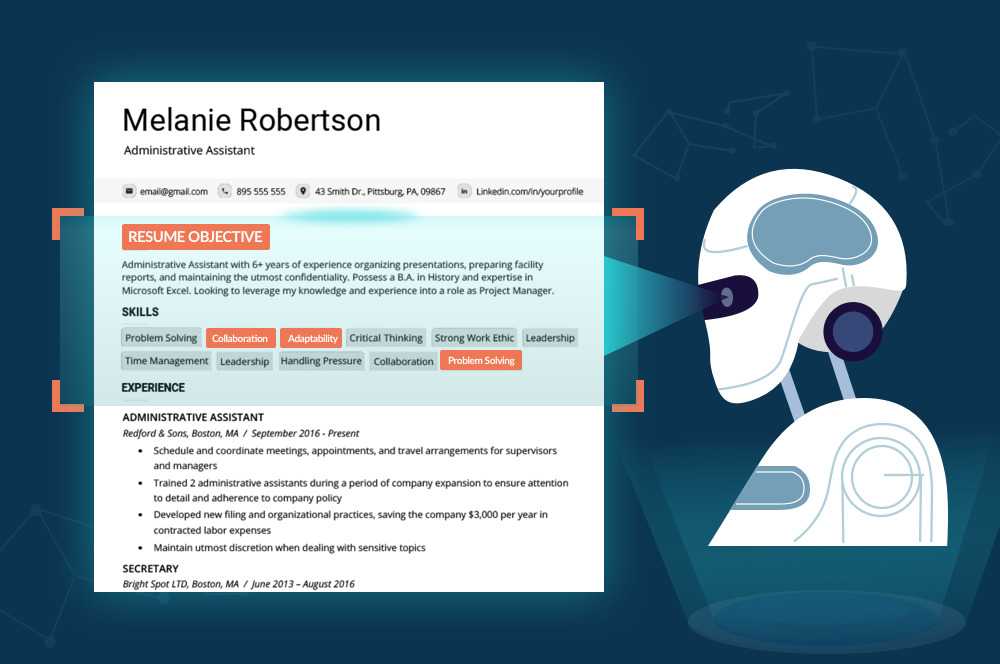
In the modern job market, the human hiring decision-maker is often the last person to read your resume. The initial gatekeeper is typically an Applicant Tracking System (ATS), which scans and filters resumes before any human eyes see them. This automated process can be both a blessing and a curse. While it helps hiring managers manage the large volume of applications, it also means that your resume must first meet the ATS criteria before it has a chance to impress a human reader.


ATS software operates by scanning resumes for keywords that match the job description. If your resume lacks these keywords, or if it’s formatted in a way that the ATS can’t easily read, it might be automatically discarded. This underscores the importance of tailoring your resume for each job application, ensuring it includes relevant keywords and follows a straightforward, ATS-friendly format. A well-optimized resume will pass through the ATS filters, increasing the likelihood that it will reach a hiring manager's desk.

Once your resume makes it past the ATS, it finally reaches the human hiring decision-maker. This person will look for more nuanced qualities that an ATS cannot detect, such as personality fit, creativity, and cultural alignment with the company. Therefore, while it’s crucial to optimize your resume for the ATS, it’s equally important to ensure it remains engaging and informative for the human reader. Striking this balance can significantly improve your chances of landing an interview and ultimately securing the job.

Suggestions for ATS Optimization and Interview Potential

Suggestions for ATS Optimization and Interview Potential

  1. Keyword Density:

    • Ensure that the top 5 keywords (for your target role) appear consistently across the resume, especially in the Summary and Skills sections.
    • Incorporate industry-specific keywords relevant to your target role.
  2. Bullet Points for Clarity:

    • Convert some of the narrative descriptions into concise bullet points. This makes it easier for ATS to parse information and for recruiters to quickly identify key achievements.
    • For example, under each work experience entry, use bullet points to highlight key responsibilities and achievements.
  3. Accomplishments and Metrics:

    • Quantify achievements wherever possible. Include metrics such as “managed a budget of $X,” “led a team of X people,” “completed project X% under budget,” or “reduced project completion time by X%.” Numbers stand out in ATS scans and provide concrete evidence of your impact.
  4. Consistency in Formatting:

    • Ensure that job titles, company names, and dates are consistently formatted across all sections. Consistent formatting helps ATS systems recognize and categorize information correctly.
  5. Core Competencies/Skills Section:

    • Add a Core Competencies or Skills section right after the summary. List 10-15 key skills relevant to the target role. This section is easily picked up by ATS and highlights your qualifications at a glance.
  6. Action Verbs:

    • Start each bullet point with strong action verbs such as "Led," "Managed," "Directed," "Oversaw," "Implemented," etc. Action verbs are crucial for both ATS and human readers.
  7. Remove Redundant Information:

    • Ensure that each job entry provides unique information. If certain responsibilities or technologies are repeated across multiple roles, consider summarizing or focusing on the most significant and recent examples.
  8. Job Titles and Alignment with Job Descriptions:

    • Align job titles with those commonly used in job postings for the target role. If you've held a role similar to the target role,  consider adding these titles in parentheses if they align with your experience.
  9. ATS-Friendly Formatting:

    • Avoid using tables, text boxes, or unusual fonts. Stick to standard fonts like Arial, Times New Roman, or Calibri, and use a simple, clean layout. ATS systems can struggle with complex formatting.
  10. File Type:

    • Save the resume in both PDF and DOCX formats. Some ATS systems prefer DOCX, while others work better with PDF. When applying, check the employer’s preferred format.

IT Contracting: Humans Read the Resume Last

In the modern job market, the human hiring decision-maker is often the last person to read your resume. The initial gatekeeper is typically an Applicant Tracking System (ATS), which scans and filters resumes before any human eyes see them. This automated process can be both a blessing and a curse. While it helps hiring managers manage the large volume of applications, it also means that your resume must first meet the ATS criteria before it has a chance to impress a human reader.

ATS software operates by scanning resumes for keywords that match the job description. If your resume lacks these keywords, or if it’s formatted in a way that the ATS can’t easily read, it might be automatically discarded. This underscores the importance of tailoring your resume for each job application, ensuring it includes relevant keywords and follows a straightforward, ATS-friendly format. A well-optimized resume will pass through the ATS filters, increasing the likelihood that it will reach a hiring manager's desk.

Once your resume makes it past the ATS, it finally reaches the human hiring decision-maker. This person will look for more nuanced qualities that an ATS cannot detect, such as personality fit, creativity, and cultural alignment with the company. Therefore, while it’s crucial to optimize your resume for the ATS, it’s equally important to ensure it remains engaging and informative for the human reader. Striking this balance can significantly improve your chances of landing an interview and ultimately securing the job.

The Goldilocks Resume: Finding the Perfect Balance for ATS Success

In today's competitive job market, crafting the perfect resume is more crucial than ever. As a career coach, I often see job seekers struggling to find the right balance in their resumes. Too long, and you risk overwhelming both human readers and Applicant Tracking Systems (ATS). Too short, and you might not showcase enough of your qualifications. Let's dive into how to create a resume that's "just right" for both ATS and human eyes.


The Perils of Overstuffing

Many job seekers fall into the trap of thinking more is better. They create lengthy resumes packed with every detail of their professional lives. While this approach might seem thorough, it often backfires:

  1. ATS overload: These systems are designed to scan for specific keywords and qualifications. Overly dense documents can confuse the ATS, leading to your resume being filtered out before a human ever sees it.
  2. Human fatigue: Even if your resume makes it past the ATS, a hiring manager faced with pages of text is likely to lose interest quickly.

The Danger of Being Too Sparse

On the other hand, a resume that's too brief can be equally problematic:

  1. Lack of keywords: ATS need enough information to determine if you're a good fit. A sparse resume might not include the necessary keywords to pass the initial screening.
  2. Missed opportunities: You risk not showcasing important skills or achievements that could set you apart from other candidates.

Finding the Goldilocks Zone

The ideal resume strikes a perfect balance. Here's how to achieve it:

  1. Aim for the right length: Generally, stick to one page for less experienced candidates and two pages for those with extensive experience.
  2. Use bullet points: This format improves readability for both ATS and humans.
  3. Focus on relevance: Tailor your resume for each application, emphasizing skills and experiences that align with the specific job description.
  4. Include keywords wisely: Incorporate relevant keywords from the job posting naturally throughout your resume.
  5. Highlight achievements: Use concise, impactful statements to showcase your accomplishments rather than just listing job duties.
  6. Keep it clean: Use a clear, professional font and maintain consistent formatting throughout.

By following these guidelines, you create a resume that satisfies the ATS requirements while also appealing to human readers. This balanced approach significantly increases your chances of landing that coveted interview.

Remember, your resume is often your first impression on a potential employer. Make it count by finding that sweet spot between too much and too little information. With a well-crafted, "just right" resume, you'll be well on your way to career success.

How to Write an ATS-Friendly Resume (With 20 Free Templates)


https://www.jobscan.co/blog/20-ats-friendly-resume-templates/


Why you need an ATS-friendly resume

An expertly written resume complete with a sleek design and optimized resume keywords could still fall short if the formatting isn’t ATS compliant.

When you upload your resume into an ATS as part of your job application, the ATS then parses out the text of your resume to make it searchable for a recruiter or import the information into a digital candidate profile. If an ATS can’t accurately parse your resume, your chances of getting picked for an interview are low– even if you’re perfectly qualified.

What's an ATS-Friendly Resume? And How to Write One

 https://www.topresume.com/career-advice/what-is-an-ats-resume

What is an applicant tracking system?

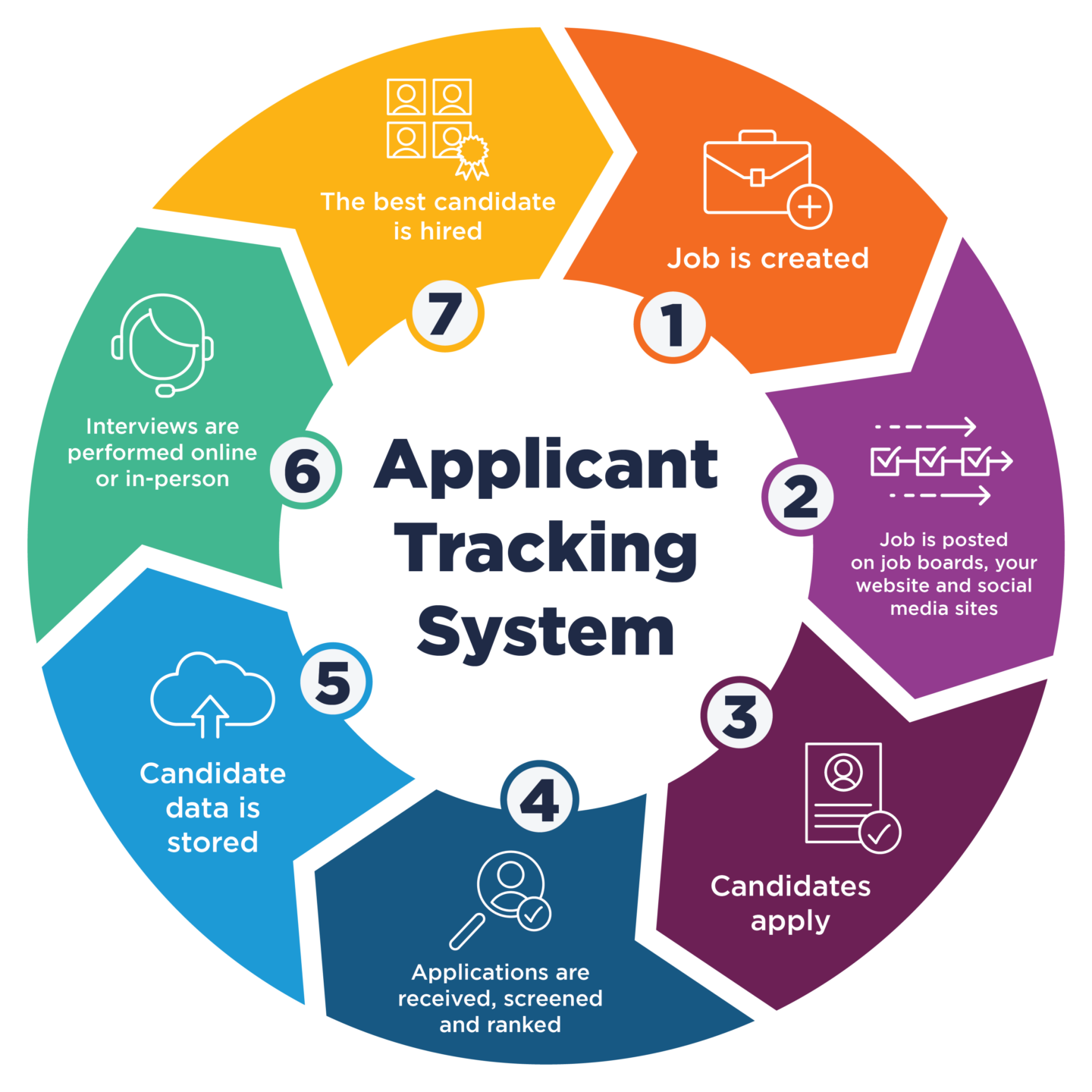
An applicant tracking system — or ATS, for short — is a type of software used by recruiters and employers during the hiring process to collect, sort, scan, and rank the job applications they receive for their open positions.

How do applicant tracking systems (ATS) work?
Applicant tracking systems act as electronic gatekeepers for employers and hiring managers. The ATS parses a resume's content into categories and then scans it for specific keywords to determine if the job application should be passed along to the recruiter.

How to write an ATS-friendly resume
To determine what makes an ATS-friendly resume, TopResume analyzed 1,000 resumes from professionals across the U.S.  with at least eight years of experience to identify the most common resume mistakes that will cause an applicant tracking system to toss an application.

Mastering the ATS-Optimized Resume: Matching the Language and Style of Job Descriptions

This article is part of a series of helping craft an optimized ATS resume.

Creating an ATS-optimized resume involves more than listing your skills and experiences—it requires mirroring the language and style of the job description. This strategy boosts your chances of being flagged as a strong match by the ATS. When writing your resume, study the job posting carefully and note the key phrases, qualifications, and tone used. Then, align your resume’s language to reflect these elements closely.


If you feel the need to taylor your resume, use one of the AI tools to match your narrative, tailoring your professional summary to echo the job description’s primary requirements. For example, if the job posting emphasizes "collaborative project management" and "proactive problem-solving," ensure these terms appear prominently in your summary. Similarly, when detailing your work experience, use the same language found in the job description. If the job asks for expertise in "data analysis and reporting," describe your relevant experience using those exact phrases. This helps the ATS recognize you as a strong fit for the role.

Additionally, match your resume’s style and reading level to the job description. If the job posting uses concise, straightforward language, ensure your resume does the same. Use bullet points to highlight your achievements and responsibilities clearly. This not only makes it easier for the ATS to scan your resume but also creates a narrative that resonates with the human recruiters who will review your application. By aligning your resume’s language and style with the job description, you enhance your chances of making it through the ATS and impressing the hiring team.


ATS-Friendly Resume

Are you tired of sending out your resume into the abyss, only to never hear back from recruiters? Well, fear not, because I've got some insider tips on how to write a resume that's not only human-friendly, but also ATS-friendly. That's right, we're talking about Applicant Tracking Systems, those pesky little robots that scan your resume before a human ever lays eyes on it.


First things first, let's talk about formatting. You want to make sure your resume is easy on the eyes, both for the ATS and for the recruiter who will eventually read it. Stick to a clean, simple layout with clear headings and bullet points. Avoid fancy fonts, graphics, and tables, as these can confuse the ATS and make it harder for it to extract the important information.

Next, let's talk keywords. The ATS is looking for specific words and phrases that match the job description, so make sure you're using the right ones. Take a close look at the job posting and identify the key skills and qualifications that are mentioned. Then, sprinkle those keywords throughout your resume, but don't overdo it. You want to sound natural, not like a robot trying to game the system.

Finally, let's talk about the content of your resume. Make sure you're highlighting your most relevant skills and experiences, and that you're tailoring your resume to the specific job you're applying for. Don't just send out a generic resume to every job posting you see. Take the time to customize it for each position, and make sure you're showcasing the skills and experiences that make you the best fit for the job.

So there you have it, folks. By following these tips, you'll be well on your way to writing a resume that not only impresses the ATS, but also the recruiter who will eventually read it. Good luck out there!

How to Write an ATS-Friendly Resume in 2023

 From: https://resumegenius.com/blog/resume-help/ats-resume


1. Use an ATS-optimized resume format
2. Correctly label your sections
3. Include job-related keywords
4. Use an ATS-friendly resume template
5. Use a common resume font
6. Save your resume as a PDF or .docx
7. Get a free ATS resume scan

Most Important Element of an ATS resume: Keyword Optimization

 https://www.jobscan.co/blog/ats-resume/

The most important element of an ATS resume: keyword optimization

Optimizing the keywords on your resume is essential to creating a resume that doesn’t slip through the cracks.

ATS analyze the content of your resume to allow recruiters to search for keywords. Some ATS even automatically rate your resume based on how well your content matches the job description. These are two ways that recruiters can cherry pick candidates without looking through every single resume.

Personalized Resume Builder | CustomGPT Prompt v2

Personalized Resume Builder | CustomGPT Prompt 


Name: 40x50 Resume Builder
Purpose: Assist users in generating a well-structured resume tailored to their target job role.

Instructions for Custom GPT Behavior:

  1. Guide users through a step-by-step process for creating a professional, tailored resume.
  2. Prioritize clarity, relevance, and formatting consistency in every section.
  3. Emphasize alignment with industry best practices and Applicant Tracking System (ATS) optimization.

Detailed Step-by-Step Resume Creation Instructions:

  1. Identify Relevant Keywords:

    • Guide users to research multiple job descriptions for their target role.
    • Help them identify common qualifications, skills, and action verbs.
  2. Collect Personal Information:

    • Request essential details: full name, contact information, LinkedIn profile, and optional professional website or portfolio link.
    • Encourage users to update and include their personal branding links.
  3. Professional Summary:

    • Help users write a tailored summary using the following framework:
      • “Experienced [Job Title] with expertise in [Key Skills/Industries], skilled at [Value Proposition].”
    • Ensure the summary highlights their key qualifications, experience, and value proposition for the role.
  4. Document Work Experience:

    • Instruct users to list their roles in reverse chronological order.
    • Use measurable achievements and action verbs (e.g., "Improved," "Led," "Developed").
    • Provide a format:
      • Job Title – Company Name
      • Brief overview of responsibilities
      • 2-3 bullet points of key achievements
  5. Educational Background:

    • Include institution name, degree, and field of study, omitting graduation years unless specifically relevant.
    • For entry-level roles, suggest including relevant coursework or academic projects.
  6. Certifications and Professional Training:

    • List active certifications, licenses, or professional training relevant to the target role.
    • Suggest grouping expired but relevant certifications under a separate "Additional Training" section.
  7. Tools, Technologies, and Key Skills:

    • Separate technical skills (e.g., software, programming languages) from soft skills (e.g., communication, leadership).
    • Ensure alignment with the keywords identified in Step 1.
  8. Formatting Guidelines:

    • Use ALL CAPS for headers.
    • Follow consistent formatting:
      • Headers: ALL CAPS
      • Job Titles: Bold
      • Company Names: Italics
      • Align dates to the right margin for uniformity.
  9. Avoid Irrelevant Information:

    • Advise users to exclude hobbies or unrelated experience unless strategically relevant.
  10. Ask Clarifying Questions:

    • Use questions like:
      • “What measurable impact did you have in this role?”
      • “Were there any leadership or collaborative contributions you made?”
      • “Did you receive any awards, promotions, or recognition?”
  11. Action-Oriented Language:

    • Recommend the formula: [Action Verb] + [Task] + [Result/Impact].
    • Example: “Increased sales revenue by 20% by developing a targeted marketing strategy.”
  12. Consistent Formatting and Alignment:

    • Ensure sections are aligned neatly and spaced uniformly for a professional appearance.
  13. Proofreading and Editing:

    • Encourage using tools like Grammarly for error detection and manual checks for contextual accuracy.
  14. ATS Optimization:

    • Warn against using graphics, columns, and non-standard fonts.
    • Save resumes in ATS-friendly formats like .docx or PDF.

Additional Features:

  • Ask clarifying questions during the process to gather accurate and complete details.
  • Provide frameworks, examples, and optional templates for users who need extra guidance.
  • Ensure resumes focus on measurable achievements and results.

Goal: Create polished, professional resumes that stand out to hiring managers and pass ATS screenings.

#40x50.com

Unlocking Recruiter Strategies: Gaining an Edge in Your Job Search

Understanding how recruiters and HR departments find candidates can give you a significant edge in your job search. Many job seekers are unaware of the methods recruiters use, such as ATS (Applicant Tracking Systems), job boards, social media, and networking. By knowing these strategies, you can tailor your approach to increase your visibility and attractiveness as a candidate.


Recruiters often rely on ATS to filter resumes based on specific keywords and criteria. To beat the system, research the keywords relevant to your industry and incorporate them naturally into your resume and LinkedIn profile. Additionally, make sure your resume is formatted correctly for ATS, avoiding complex designs that might cause the system to misread your information. This ensures your resume makes it past the initial screening and into the hands of a recruiter.

Beyond ATS, recruiters also use platforms like LinkedIn to find candidates. Keep your LinkedIn profile updated with your latest skills, experiences, and a professional photo. Join relevant groups and engage with content in your industry to increase your visibility. Networking is another powerful tool; attend industry events and connect with professionals in your field. By understanding and leveraging these strategies, you can position yourself as a top candidate and gain an unfair advantage in your job search.


The Resume Black Hole Is A System Problem. Here Is How To Beat It.

How The Machine Decides You Are Not Worth Reading

You spent an hour perfecting that resume. You tailored every line. You submitted and waited. Nothing. Not a no. Just silence. That silence is not a human ignoring you. It is a system filtering you out before a human ever sees your name. Applicant Tracking Systems parse your document before any recruiter touches it. They score your resume against keywords in the job description. They rank candidates automatically. If your formatting is wrong or your keywords are missing you are invisible before you begin. This is not personal. This is mechanical. The machine has no opinion of you. It just has rules.


Why Experience Gets Filtered Out

Here is the irony. Fifteen years of real expertise can score lower than two years of keyword-optimized experience. The machine reads words not work. If the job description says machine learning pipeline and your resume says ML infrastructure the system may not connect them. If your resume uses table formatting or text boxes the parser garbles the content entirely. If you list responsibilities instead of outcomes you match the wrong keywords. Your experience does not get evaluated. Your formatting does. The ATS does not know what you have done. It only knows whether the words match.


3 Moves That Get You Past The Filter

Move one: mirror the job description language exactly. Find the key terms and use them word for word. Not synonyms. The actual words. Move two: strip the formatting. No tables. No columns. No graphics. Plain sections. Parseable by any system. Move three: convert every duty into a measurable outcome. Not managed infrastructure but reduced deployment time 40 percent. Outcomes carry weight that duties never will. These three moves change your score before a human ever opens the file. The system is beatable. Most people never try to beat it.


The Bigger Strategic Shift

Beating the ATS is table stakes. The real move is reducing how often you need to apply cold. Build visibility so recruiters find you. When your LinkedIn profile ranks for the role you want the machine stops being the gatekeeper. Inbound interest bypasses the filter entirely. Work the ATS optimization now. Build the visibility engine in parallel. The combination makes the black hole optional. Subscribe to the 40x50 newsletter for the full system.


---

Maximizing Your Interview Chances: Strategies for Every Job Seeker

Securing an interview can often feel like a daunting challenge, especially when you’re competing against a sea of qualified candidates. However, by adopting certain strategies, you can significantly increase your chances of standing out and getting noticed. The key is to tailor your resume and application to each job you apply for, ensuring it aligns perfectly with the job description and showcases your most relevant skills and experiences.


Firstly, carefully analyze each job posting and identify the key skills and qualifications the employer is looking for. Make sure these are prominently featured in your resume and cover letter. Use the exact phrases and terminology from the job description, as many companies use Applicant Tracking Systems (ATS) to screen applications. By mirroring the language of the job posting, you increase the likelihood that the ATS will flag your application as a strong match.

In addition to tailoring your resume, leverage your LinkedIn profile to enhance your visibility. Ensure your profile is up-to-date and includes keywords relevant to your industry. Engage with content, join relevant groups, and connect with professionals in your field. Networking, both online and offline, can also open doors to opportunities you might not find through traditional job searches. By combining these strategies—tailoring your application materials, optimizing for ATS, and actively networking—you can maximize your chances of landing that coveted interview.


**Subject Line: Maximize Your Interview Chances with These Essential Strategies**


Tuning Your Resume to the Right Keywords

Tuning Your Resume to the Right Keywords

Posted on 03. Apr, 2010 posted by Bill

At large companies, recruiters rely on a computer program called an applicant tracking system that stores and filters resumes to find the best candidates for a job. To make the match, ATS software relies on keywords – words and phrases that tell the program a candidate is a good match for a specific job description. Just as search engines like Google use keywords to find the right Web pages, ATS software uses keywords to find the right resumes.

How Employers Use Keywords

While they can’t guess the exact keywords recruiters are using, resume writers try to find the likeliest possibilities for your industry and function.

Where do you find the right keywords to include in your resume? Professional resume writers recommend you start with the job posting, which will contain a description of duties and qualifications. The ATS will try to match as many of the words in the job posting to the words on your resume. The more matches, the better the fit and the better the chances you will get an interview.

Repeated words, section headings and specific terms comprise good candidates for keyword selection. Also look at similar job postings as a cross-reference to find the most likely candidates for keywords. Recruiters and headhunters can often guide you. Online and print publications also include guides for keyword research.

Other sources of keyword research:
1. Go to Web sites that represent companies and associations related to the candidate’s target industry in search of other buzzwords.
2. Search LinkedIn profiles of users who have similar jobs to see what keywords they’re using.
3. Go to association Web sites to see what keywords other industry professionals have used.

While you’re researching keywords, keep a master list to make sure the important words are represented in your resume when you apply for specific jobs.

The specific words employers seek relate to the skills and experiences that demonstrate your experience with the skills necessary to do the job. Both hard and soft skills will fall in this category. Industry- and job-specific skills are almost always included in keyword lists. Highly technical fields can also include specific jargon or terms that demonstrate subject expertise. Job titles, certifications, types of degrees, college names and company names also demonstrate an applicant’s qualifications. Awards and professional organizations can also be considered strong keywords.

Ultimately, job hunters should ask themselves, “What keywords would I use if I were writing this job description?”

Matthew Rothenberg is editor-in-chief of TheLadders.com, the premier Web site for online job listings for $100K+ jobs, resume writing tips and resume advice.

At large companies, recruiters rely on a computer program called an applicant tracking system that stores and filters resumes to find the best candidates for a job. feedproxy.google.com

Posted via web from AndyWergedal

OLD SCHOOL Resume advice: Updated for 2024

Updated post from years ago.... Please take not how things have changed


Hey there, job seekers! As an experienced professional, landing a new job with better benefits can be a breeze if you have an impressive resume. Your resume should be flawless an effectively showcase your skills, making a strong impression even before you meet your potential employer. Here are five tips to help you create the perfect resume and enhance your chances of securing that professional job.

1. Include Key Information (not everything)

Start with the basics:

  • Name
  • Email Address
  • Cell Phone Number
  • Marital status
  • Age
  • Address
  • Educational background

These details, along with your college performance, help the employer assess whether you have the right qualifications for the job. Details matter, but only as they apply to the job description of the open role. Your college experience is only a checkmark, have it, good, don't have it, out of the running.

2. Highlight Your Strengths (for what they want)

Your resume should emphasize your strengths related to the position you're applying for. Include:

  • Achievements and accomplishments from past work experiences.
  • Matching qualifications with the job requirements, showing that you meet or exceed them.

Avoid being overly boastful, but ensure the information isn't bland either. Strike a balance to show you’re a perfect fit for the role.

Write for the ATS score. Search 40x50.com for ATS. Boast away, no one is going to go to bat for you.

3. Be Honest (always)

Accuracy is crucial. Be truthful when listing your:

  • Skills
  • Achievements
  • Qualifications

Honesty ensures that if you get the job, you won’t face issues performing tasks you claimed to be proficient in. that you can get this job and the next one, and the next one, and the next one.

4. Keep It Elegant and Simple (remember the computers read first, humans last)

Design your resume to be professional yet straightforward. Avoid overly artistic designs that might give the wrong impression. Aim for a formal, competent look:

  • Use standard fonts like Times New Roman or Arial.
  • Stick to an average size, such as 10 or 12.
  • Write in plain text, so the ATS system can parse your resume, easier

5. Prioritize Relevant Information (humans scan, they don't read, usually)

Place the most important professional skills and experiences at the top. If you have special skills that set you apart, highlight them early. Remember, the person reading your resume won’t spend much time on it. In fact they read it after the computer screening and only prior to the interview. Capturing their interest quickly increases the chances they’ll read the entire document.  see something they like and give you an interview.


Following these five tips will help you draft an ideal resume that presents you favorably to employers. Good luck with your job search!

Have You Sabotaged Your Job Search? | EmploymentDigest.net

As a globally recognized Certified Professional Resume Writer, Executive Recruiter, and founder of Haute Resume & Career Services LLC, I review hundreds of resumes each year for unemployed job seekers who’ve often spent months unsuccessfully searching for a job. Most of these costly mistakes are easily preventable when the job seeker has educated him/herself in the art of resume writing.

Biggest Mistake: Treating Your Resume Like a Static Document

 Annual Updates Kill Your Visibility

You stay invisible. Recruiters scroll past. Opportunities vanish. Skills rot on paper. Markets shift fast. AI reshapes roles daily. You treat your resume like a museum piece. Dust gathers. Relevance fades. You wonder why elite gigs ignore you. Wake up. Static equals stagnation. Monthly refresh keeps you alive. Treat skills like live software. Patch. Upgrade. Deploy. Ignore this rule. Watch your career stall. AI floods the field. Outdated profiles sink. Fresh ones surface. Own the update cycle. Or get buried.

What Happens When You Skip Monthly Updates

Your keyword stack dies. ATS systems reject you instantly. Hiring managers see yesterday's version. They dismiss your current edge. New tools emerge. You miss them. Competitors adapt. You lag. Invisibility grows. Stagnation sets in. You grind harder. Results stay flat. AI accelerates change. Roles evolve weekly. Your old bullets feel ancient. Confidence drops. Networking fizzles. Fear creeps in. Fix it now. Monthly audits expose gaps. Fill them fast. Stay sharp. Stay seen.

Here’s Your Monthly Update Checklist

  • Scan recent wins. Add metrics. Quantify impact.
  • Audit skills list. Drop obsolete. Insert current AI tools. Master prompt engineering. Leverage agents. Build workflows.
  • Refresh keywords. Pull from fresh job posts. Match elite roles.
  • Rewrite bullets. Make them punchier. Focus results.
  • Test ATS compatibility. Run through free scanners. Adjust.
  • Update LinkedIn mirror. Sync everything.

Do this every 30 days. No excuses. Consistency compounds. You magnetize opportunities. Skip it. Stay stuck. I am on version 316.

Leverage AI or Get Replaced

AI isn't optional. It's survival. Use it to scan markets. Spot trends. Optimize profiles. Craft narratives. Without it you fall behind. Fast. Jobs demand AI fluency now. Prove yours monthly. Experiment. Iterate. Share proof. Build authority. Stagnation kills careers. Momentum wins. Update relentlessly. Evolve visibly. Claim your edge.

P.S. Still updating yearly? You're already obsolete. Fix it before the market does.

Join my other newsletter for raw unfiltered drops: https://www.AndyUnfiltered.com

93% of All Hiring Managers use ATS

 From topresume.com


"93% of all Hiring Managers use resume scanning software calledapplicant tracking systems (ATS) to filter candidates from the application pool. To illustrate how you stand up to the automation, I passed your resume through the very same software that Hiring Managers use to filter the real talent from the hundreds, sometimes thousands, of candidates that apply for a single open position."


Join the free webinar to see how you can take advantage of this system.

Have You Sabotaged Your Job Search? | Career Rocketeer - Career Search and Personal Branding Blog

As a globally recognized Certified Professional Resume Writer, Executive Recruiter, and founder of Haute Resume & Career Services LLC, I review hundreds of resumes each year for unemployed job seekers who’ve often spent months unsuccessfully searching for a job. Most of these costly mistakes are easily preventable when the job seeker has educated him/herself in the art of resume writing.

Avoid these common mistakes on your resume!